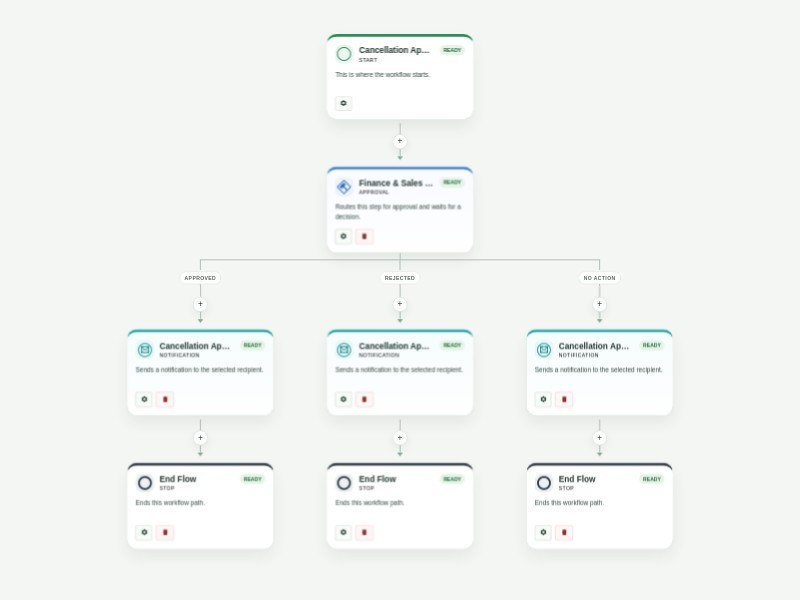
Use Template Preview Cancellation Approval Process Template Get order cancellation requests through your website and respond to them immediately with AbcSubmit's free Cancellation Approval Process Template. When a customer cancels their order through your website’s order cancellation form, the related departments like finance and sales in the approval flow will receive their submission and decide whether to approve or reject it. Based on the final decision, an automated confirmation or rejection email will be sent to the customer regarding their order status. You shouldn’t have to cancel your plans to create a better order cancellation process. Luckily, AbcSubmit's drag-and-drop interface makes it fast and easy to update this Cancellation Approval Process Template for your online store. Without any coding, you can fully customize the order cancellation form to meet your needs, assign different people to the approval flow, create new conditions and autoresponder emails, and more. Use our Cancellation Approval Process Template to manage your approval flow, track cancelled orders, and keep customers happy!
Use Template Preview Purchase Order Approval Template Keep purchase order requests moving with a clear, repeatable approval process. This template collects office supply requests, routes them through department and finance review, and gives each approver the context needed to make a confident decision. After the first review, the requester completes vendor, cost center, item, and delivery details in a linked purchase order form. The completed request then goes to final COO approval, while automatic updates keep the requester informed when a request is denied, overdue, or approved. Customize the approver email fields, request questions, approval timing, and notification messages to match your purchasing policy. Use the workflow activity history to see where each request is waiting and maintain an auditable record of every decision.
Use Template Preview Appointment Scheduling Workflow Template Automate appointment requests with a structured review and calendar scheduling flow for clinics, consultants, service teams, and administrative staff. Collect client details, requested dates and times, appointment needs, and the staff member responsible for approval. Approved requests continue to a configurable Google Calendar step and notify the client that the appointment is set. Rejected or expired reviews notify the client that the request was not accepted. Customize approvers, scheduling settings, calendar configuration, and notification content for your organization.